

Seedance 2.5 launched publicly on July 31, 2026 and changes four things that actually affect how you write a prompt: one continuous take can run 30 seconds instead of 15, sound is generated in the same pass as the picture, a single generation can address up to 50 attached assets by name, and the model plans multiple narrative beats inside one unbroken shot. On Morphed it renders 4 to 30 seconds at 480p or 720p, costs 34 credits per second at 480p and 73 at 720p with audio included in both rates, and runs in three modes: text-to-video, image-to-video with an optional end frame, and reference-to-video. This page covers only what is new. For general cinematic, product, UGC, and short-form categories, the Seedance 2.0 prompt library already covers that ground and most of it transfers unchanged.
| If you want | Write | Duration | Mode | Avoid |
|---|---|---|---|---|
| A 30-second one-take scene | setup, turn, payoff, with the camera named in each phase | 24-30s | text-to-video | a 10-second prompt stretched thin |
| Spoken dialogue in the clip | the exact line in quotation marks | 8-20s | text or reference | "she says something encouraging" |
| A consistent spokesperson | @Image1 for look, @Audio1 for the line | 10-20s | reference | letting three images all define the face |
| Camera motion copied from footage | @Video1 with the move described in words too | 8-20s | reference | attaching a clip and saying nothing |
| Beats with timing | timestamped beats inside one take | 20-30s | text or reference | shot labels that imply hard cuts |
| A cheap iteration loop | the same prompt at 480p first | any | any | drafting at 720p |
Fun timing note for anyone tracking the release calendar: Seedance 2.5 and MiniMax H3 went public on the same day, July 31, 2026. If you are choosing between them, H3 goes higher in resolution and Seedance goes longer with sound. The Hailuo 3 prompt recipes cover the other side of that split.
What 2.5 changes that 2.0 did not do
Four capability changes matter for prompting: duration doubled, the reference ceiling went up roughly fivefold, audio became joint rather than absent or bolted on, and editing moved to the region level. Everything else about prompt craft, subject then action then camera then lighting then style, carries over from Seedance 2.0 intact.
| Capability | Seedance 2.0 | Seedance 2.5 | What it changes in your prompt |
|---|---|---|---|
| Single continuous take | up to 15s | up to 30s | you now need a mid-clip turn, not just an action |
| Reference assets | roughly 9 images, 3 video, 3 audio | 30 images, 10 video, 10 audio, 50 total | you assign roles per asset instead of per slot |
| Audio | generated separately from the picture | joint audio and video synthesis with lip-sync | quoted dialogue lines become a real instruction |
| Editing | whole-frame regeneration | region-level editing and stronger multi-shot planning | you can describe what stays fixed while one area changes |
| Beat planning | shot labels for cuts | timed beats inside one shot | timestamps replace "Shot 1, Shot 2" |
The upstream model also supports extending a generation beyond 30 seconds in additional rounds. That is not exposed on Morphed, so treat 30 seconds as the hard ceiling here and plan the arc to close inside it.
How do you direct a take that runs a full 30 seconds?
A 30-second take needs three phases and a named camera behavior in each one: setup that establishes subject and space, a turn where something concrete changes, and a payoff where the camera arrives somewhere. Under-specified camera direction is the single most commonly reported weak point in this model, and it shows up worst in the middle third of long takes.
The clip above is the actual 480p draft, sound on: one unbroken take, three scripted lines, and every scene change happening behind the performer while the camera never cuts.
Here is the failure mode, written out. This is a perfectly reasonable 10-second prompt:
A ceramicist works at a pottery wheel in a sunlit studio, warm light, cinematic, slow camera movement, dust in the air.
At 8 seconds that produces something decent. At 30 seconds it produces roughly 8 seconds of pottery and 22 seconds of the model looking for something to do. You get drifting hands, a camera that wanders without arriving, and often an invented cut somewhere past the halfway mark because nothing in the prompt says the shot is continuous.
The same idea rebuilt for the full duration:
One continuous 30-second take in a sunlit ceramics studio, no cuts.
Seconds 0-9: a ceramicist centers a wet lump of clay on the wheel, both thumbs pressing down, the camera holds a wide side view at bench height while dust drifts through the window light.
Seconds 9-20: the walls of a bowl rise between her hands, the camera begins a slow arc to the left and lowers toward the wheel head, water running down her wrists.
Seconds 20-30: she lifts her hands away and the finished rim wobbles once, the camera settles into a tight macro on the wet rim and stops moving as the wheel slows.
Audio: wheel motor hum, wet clay friction, one distant street sound through the open window.
The difference is not length. It is that every third of the clip has a job for the subject and a job for the camera, and the phrase "no cuts" tells the model the shot is unbroken. Six prompts built on that pattern:
One-take aerial descent
One unbroken 30-second aerial. Seconds 0-10: the camera hangs above a fog-covered ridge, slowly drifting forward as the cloud layer thins. Seconds 10-22: it dives down the cliff face at increasing speed, rock texture rushing past on the right side of frame. Seconds 22-30: it levels off two meters above a black-sand shoreline, skims a breaking wave, and climbs back into golden-hour cloud. Continuous motion, no cuts. Audio: wind pressure, surf below, no music.
Best settings: 21:9 or 16:9, 30s, audio on.
Walking monologue through a night market
One continuous 24-second handheld take. A vendor in a canvas apron walks the camera through a covered night market, speaking directly to the lens while stepping around crates. Seconds 0-8: he starts at a fruit stall, gesturing at stacked crates. Seconds 8-16: he turns a corner into a narrower aisle, steam from a noodle cart crossing frame between him and the camera. Seconds 16-24: he stops at his own stall, puts one hand on the counter, and looks straight down the lens. The camera walks backward at his pace the entire time, never cutting.
Best settings: 9:16, 24s, audio on.
Pre-dawn bakery arc
One continuous 30-second take, no cuts. A baker unlocks a dark shopfront at 4am. Seconds 0-10: he flips three light switches in sequence and the room brightens in steps, the camera pushes in slowly from the doorway. Seconds 10-20: he slides a full tray into a rack, flour hanging in the new light, the camera drifts right along the counter. Seconds 20-30: the first customer's silhouette appears at the glass door behind him, the camera stops and holds on the two of them in the same frame.
Best settings: 16:9, 30s, audio on.
Greenhouse continuous dolly
One unbroken 28-second forward dolly down the center aisle of a working greenhouse. The camera never stops moving and never cuts. Broad leaves brush past the lens at intervals, condensation beads on the roof panels above, an irrigation line ticks on halfway through and begins misting the left side of frame. The shot ends at a potting bench where a pair of gloved hands is repotting a seedling, arriving at chest height.
Best settings: 16:9, 28s, audio on.
Laundromat waiting scene
One continuous 26-second take. A woman sits alone in a fluorescent-lit laundromat at night, staring at a tumbling dryer. Seconds 0-9: locked wide frame, the dryer drum turning, her posture slack. Seconds 9-18: her phone lights up on the bench beside her and she picks it up, the camera slowly pushes in from wide to medium. Seconds 18-26: she puts the phone face down, sits up straighter, and looks at the door, the push-in ending on a tight three-quarter framing. No cuts.
Best settings: 9:16 or 16:9, 26s, audio on.
Ferry deck monologue
One continuous 30-second take on the open rear deck of a ferry. A woman in a windbreaker leans on the rail with the wake stretching behind her and talks to the camera the whole time. The camera starts at a wide three-quarter angle, orbits slowly counterclockwise across 30 seconds until it is nearly beside her looking out at the same horizon, and finishes there. Hair and jacket move constantly in the wind. No cuts, no zooms.
Best settings: 16:9, 30s, audio on.
Workshop process, setup to payoff
One unbroken 30-second take in a bicycle repair workshop. Seconds 0-10: a mechanic spins a wheel and watches it wobble, the camera at wheel height, static. Seconds 10-21: she works a spoke wrench in small increments, spinning and stopping the wheel repeatedly, the camera drifts slowly upward toward her face. Seconds 21-30: the wheel spins true and silent, she straightens up and steps back, the camera settles at chest height on the still-spinning wheel. Audio: spoke ping, wheel bearing whir, workshop radio low in the background.
Best settings: 16:9, 30s, audio on.
How do you prompt sound and picture in the same pass?
Native audio is generated jointly with the video, so sound cues are direction rather than post-production notes. The two instructions that carry the most weight are exact dialogue in quotation marks and ambience named by its physical source. Descriptions of dialogue ("she says something reassuring") give the model nothing to lip-sync against. A written line does.
Ambience follows the same rule. "Atmospheric sound design" is a mood word. "Rain on a tin roof, one gutter overflowing" is a source, and sources produce audio that matches what the picture is doing.
Quoted line to camera
A woman in her thirties sits on the edge of a desk in a small office, speaking straight to camera. She says, in a calm and even voice: "I rebuilt the whole thing over a weekend, and honestly the hardest part was admitting the first version didn't work." Slow push-in from medium to medium-close over the line. Audio: her voice clearly forward in the mix, faint air conditioning, no music.
Best settings: 9:16, 12s, audio on.
Two-person exchange
Two colleagues stand at a kitchen counter in an office break room, holding paper cups. The first says: "You actually read the whole thing?" The second answers, half laughing: "Twice. It gets better the second time." The camera holds a static two-shot at counter height, no cuts. Audio: both voices in the room with natural reverb, a kettle clicking off near the end of the line.
Best settings: 16:9, 14s, audio on.
Ambience bed, no dialogue
An empty covered porch during a heavy afternoon storm, no people in frame. Rain hammers a tin roof, one corner gutter overflows in a steady stream onto stone, wind pushes a hanging chair a few degrees and back. The camera holds a locked wide frame for the full duration. Audio: rain on tin as the dominant layer, gutter water splash on stone, one low thunder roll around two thirds through. No music, no voice.
Best settings: 16:9, 20s, audio on.
Beat-synced action
A dancer in a plain rehearsal room moves to a steady mid-tempo electronic track generated with the clip. Each direction change lands on a downbeat, and a single overhead light flickers on the same beats. The camera orbits slowly clockwise at chest height throughout. Audio: percussive electronic loop with a clear four-count, footfall impacts audible on the floor, no vocals.
Best settings: 9:16, 16s, audio on.
Narration over working hands
Close overhead framing of a pair of hands assembling a wooden puzzle box on a workbench, face never in frame. A voice narrates over the action: "Every piece here is cut from the same board, which is the only reason the grain lines up." The camera stays overhead and drifts slowly toward the box as the last piece slides home. Audio: narration slightly warm and close, wood-on-wood friction, one soft click at the end.
Best settings: 1:1 or 16:9, 14s, audio on.
Sound event drives the camera
A quiet home studio at night. A metal music stand tips and clatters to the floor off-frame in the first two seconds, and the camera whips right toward the sound, settling on the fallen stand and scattered sheets. A person steps into frame and rights it. Audio leads the motion: the clatter is sharp and directional, followed by room silence and paper shuffle.
Best settings: 16:9, 10s, audio on.
Delivery in another language
A market vendor stands behind a tray of fresh herbs and delivers one short greeting line to camera in Spanish, warm and unhurried, with mouth movement matched to the words. The camera holds a static medium shot. Audio: her voice forward, background market chatter kept low enough that the line stays intelligible.
Best settings: 9:16, 8s, audio on. Multilingual lip-sync is reported across roughly eight to ten languages upstream. Test your target language on a short clip before committing to a 30-second render.
How do the @Image1, @Video1, and @Audio1 tokens work?
In reference mode on Morphed you attach assets and address them inline by name: @Image1, @Video1, @Audio1, and so on. The rule that makes references work is one job per asset, stated in the prompt itself. A brief that says "@Image1 for character look, @Video1 for handheld camera rhythm, @Audio1 for beat-synced cuts" gives the model a hierarchy. A brief that attaches six images and says "match these" gives it an average.
The ceiling is 50 assets: up to 30 images, 10 video clips, and 10 audio clips in one generation. That ceiling is a capacity spec, not a target. Honest guidance on how many actually help:
| Asset count | What it is good for | What tends to go wrong |
|---|---|---|
| 1-2 | locking one face or one product | nothing, this is the most reliable band |
| 3-6 | face plus wardrobe plus location plus a track | needs explicit role labels or roles bleed |
| 7-15 | campaign consistency across a look book | diminishing returns, overlapping images start averaging |
| 16-50 | broad style corpora, rarely worth it for one clip | the brief stops being direction and becomes a mood board |
References guide a generation rather than lock it. Expect to review takes and adjust either the reference set or the wording, and change one variable at a time when you do.
Negative constraints belong in the brief too. Saying what must not change is often more effective than describing again what should. Useful phrasings: "do not change the hairstyle from @Image1", "keep the label text on the product from @Image2 unaltered", "ignore the lighting in @Video1, use only its camera movement".
Spokesperson from a photo and a voice clip
@Image1 is the exact person: face, hair, and outfit. @Audio1 is the voice and the exact line to speak.
@Image1 stands in a bright home office and delivers the line from @Audio1 straight to camera, mouth movement matched to the audio. Slow push-in from medium to medium-close. Keep face, hair, and outfit identical to @Image1 in every frame. Do not restyle the clothing.
Best settings: 9:16, 15s, reference mode, audio on.
Camera-motion transfer
@Video1 defines camera movement and blocking only. Ignore its subject, its location, and its lighting.
A glass water carafe sits on a pale stone counter in a bright kitchen. Reproduce the camera path from @Video1 exactly: the same approach speed, the same arc, the same settle. Lighting is soft daylight from the left, unrelated to @Video1.
Best settings: 16:9, 10s, reference mode.
Product identity plus palette plus track
@Image1 defines the exact product shape, material, and label. @Image2 defines the color palette of the environment only. @Audio1 defines the music and the beat timing.
The product from @Image1 sits on a low plinth. The camera arcs around it once across the clip, and the key light sweep peaks on the strongest accent in @Audio1. Environment colors follow @Image2. Do not alter the label text or the product silhouette from @Image1.
Best settings: 1:1 or 16:9, 12s, reference mode, audio on.
Wardrobe consistency across a campaign look
@Image1 is the person's face and build. @Image2 is the jacket, exact cut and color. @Image3 is the location plate.
The person from @Image1, wearing the jacket from @Image2, walks slowly through the space shown in @Image3. Handheld camera follows from the front at shoulder height. Face from @Image1 and jacket from @Image2 must stay consistent for the full duration. @Image3 controls only the environment, not the wardrobe.
Best settings: 9:16, 18s, reference mode.
Two angles of the same face
@Image1 is the front view of the person. @Image2 is the same person in three-quarter profile. Treat both as the same identity, not as two people.
The subject sits at a workbench and turns from a three-quarter angle toward the camera across the clip, ending front-on. Identity must read as one consistent person through the turn.
Best settings: 16:9, 12s, reference mode.
Rhythm from footage, performance from audio
@Video1 defines handheld camera energy only. @Audio1 defines the percussion timing.
A skateboarder rolls slowly through an empty concrete plaza at dusk. The camera carries the handheld quality of @Video1. Each push of the board lands on a percussion accent from @Audio1. Plain background, no crowd.
Best settings: 9:16, 16s, reference mode, audio on.
A brief written mostly as constraints
@Image1 is the product. @Image2 is the packaging.
A single 12-second push-in on the product from @Image1 standing beside the box from @Image2 on a matte grey surface.
Do not change the product silhouette. Do not add text or logos that are not present in @Image1 or @Image2. Do not add hands, people, or reflections of a room. Do not move the product. Only the camera moves.
Best settings: 1:1, 12s, reference mode.
How do you write multiple beats inside one unbroken shot?
Use timestamps, not shot labels. Writing "Shot 1, Shot 2, Shot 3" tells the model you want cuts, which is the right instruction in Seedance 2.0 and the wrong one here when you are paying for a continuous take. Timed beats inside one shot get you narrative progression without the model chopping the clip apart.
Product story in three timed beats
One continuous 30-second take, no cuts.
0:00-0:10 A sealed cardboard box sits on a wooden table in morning light, the camera slowly orbits a quarter turn.
0:10-0:20 Hands enter frame, cut the tape, and lift the lid, the camera pushes in over the opening.
0:20-0:30 The product is lifted out and set upright on the table, the camera lowers to table height and holds. Audio: tape tearing, cardboard flex, one soft set-down.
Problem, product, payoff in one take
One unbroken 26-second take, no cuts.
0:00-0:08 A student sits in a cluttered dorm room surrounded by loose paper, visibly stuck, camera wide and static.
0:08-0:17 She clears a space, sets one device on the desk, and switches it on, camera drifts in slowly.
0:17-0:26 She leans back with her shoulders down and half smiles at the screen glow, camera settles at a close three-quarter. Audio: paper rustle, one switch click, room tone easing.
Travel micro-documentary
One continuous 30-second take. 0:00-0:08 the camera holds on a fishing boat tied at a stone quay at first light. 0:08-0:16 it drifts right as a fisherman coils rope into a bucket. 0:16-0:24 it follows him walking up three worn steps toward the road. 0:24-0:30 it stops at the top and lets him walk out of frame, holding on the empty quay. No cuts.
Founder story to camera
One unbroken 28-second take. 0:00-0:09 a woman stands in a small warehouse aisle and begins speaking to camera about starting with one product. 0:09-0:19 she walks slowly along the shelving while still talking, the camera tracking beside her. 0:19-0:28 she stops at a packing bench, rests a hand on a stack of boxes, and finishes the thought. Continuous handheld, no cuts, natural warehouse ambience under the voice.
Recipe beats without cuts
One continuous 24-second overhead take, camera fixed above a cutting board.
0:00-0:07 hands halve and press a bulb of garlic.
0:07-0:15 the pieces slide into a hot pan that enters frame from the right and begins to sizzle immediately.
0:15-0:24 a handful of chopped herbs is scattered in and the pan is lifted out of frame. Audio: knife on board, oil sizzle rising sharply on contact, no music.
What structure are power users converging on?
A four-block prompt: style and atmosphere first, references second, a second-by-second timeline third, quality boosters last. Within a week of launch, the highest-performing prompt-sharing accounts on X settled on labeled blocks rather than one long paragraph, and the format works because it mirrors how the model reads a brief. Everything this guide teaches slots into it.
[STYLE + CAMERA + ATMOSPHERE]
Film stock or look, lighting, "one continuous single-take" plus the camera path,
then an explicit Audio: list naming every sound you expect.

[IMAGE REFERENCES]
Only when using reference mode: assign each asset a role and lock it.
"Use @Image1 as the single strict visual reference for the character.
Exact face, clothing, and body proportions locked from the reference."

[TIMELINE SECOND BY SECOND]
0-4s: [Shot size] What happens, who speaks, what the camera does.
4-12s: [Continuous] The next beat, written as motion over time.
12-20s: [Continuous] Physical consequences, entrances, near-misses.
20-30s: [Hold] The ending state, described so the model knows where to stop.

[STYLE & QUALITY BOOSTERS]
Photorealistic, coherent physics, stable character identity, no artifacts,
pure single continuous take.
Two details make this format work harder than it looks. The bracketed shot size at the start of each timeline beat ("[Handheld medium]", "[Continuous]", "[Hold]") gives the model a framing instruction exactly where the beat begins, which timed beats alone do not. And the Audio: list inside the first block keeps every expected sound in one place, so dialogue, effects, and ambience stop competing with the visual description for attention. Booster stacks still pull weight on Seedance, unlike some rival models where they are dead text, but keep them to one line: physics, identity stability, no artifacts, single take.
What about starting from a still image?
Image-to-video takes identity and style from your upload and takes time from the prompt. With an end frame attached, it also takes the destination from an image, which turns the prompt into a description of the path between two known states. Do not re-describe what the source image already shows. Describe what changes.
Closed to open, with an end frame
Start from the uploaded closed case and end on the uploaded open case. Across the clip the lid rotates open smoothly on its hinge, an interior light comes up as it opens, and the camera lowers slightly toward the opening. Product shape and finish stay exactly as in both images.
Neutral portrait to a held smile
Use the uploaded portrait as the exact identity. Over the clip the subject's expression moves from neutral to a small held smile, with one natural blink partway through and slight head settle. Hair moves gently. No change to face structure, hairstyle, or clothing.
Empty room to lit room
Start from the uploaded dark interior and finish on the uploaded lit interior. Lamps come on in sequence from the back of the room forward, curtains settle as if a door just closed, and the camera glides forward one meter total. Furniture positions do not change.
Flat pack to standing display
Use the uploaded flat packaging image as the exact artwork and material. The panels fold upward and lock into a standing display over the clip, ending in the shape shown in the uploaded end frame. Artwork must not warp or re-render. Camera holds a static three-quarter angle at table height.
What does a 30-second take actually cost?
34 credits per second at 480p, 73 credits per second at 720p, native audio included in both rates. That makes a full 30-second take 1,020 credits at 480p and 2,190 credits at 720p, a difference of 1,170 credits for the same 30 seconds of direction.
| Length | 480p | 720p | Difference |
|---|---|---|---|
| 8s | 272 | 584 | 312 |
| 15s | 510 | 1,095 | 585 |
| 24s | 816 | 1,752 | 936 |
| 30s | 1,020 | 2,190 | 1,170 |
The math argues for one workflow: draft the arc at 480p, finish once at 720p. Three 30-second drafts at 480p plus one 720p final costs 3,060 plus 2,190, or 5,250 credits. Four attempts straight at 720p costs 8,760. The 480p pass is not there to look good. It is there to tell you whether the second third of your take holds, which is the thing that actually fails.
A cheaper variant of the same loop: draft only the part you are unsure about. If beats one and three are solid and the middle is the risk, render a 12-second 480p test of just the middle section for 408 credits before spending 2,190 on the full take. Broader per-model cost comparisons live in the AI video generation cost breakdown.
What we noticed directing long takes with this model
We ran the same brief, a 30-second continuous take of a person walking and talking through an indoor space, four ways: as a short prompt stretched to 30 seconds, as a timestamped three-phase prompt, as a timestamped prompt with no camera direction, and as a reference-mode version with a face image and a voice clip. These are qualitative observations from that pass, not benchmarks, and they are worth exactly as much as one afternoon of directed testing.
The middle third is where long takes break. Both versions without explicit mid-clip camera instruction produced a recognizable pattern: a strong opening, then a stretch around the 12 to 18 second mark where the subject holds a pose and the camera drifts without arriving anywhere. Adding one sentence about what the camera does during that window fixed it more reliably than any amount of extra subject description.
Prompts written for short clips do not scale by duration. The stretched version was not worse in quality, it was worse in structure. It ran out of material and started repeating gestures. If you are moving a working 10-second prompt to 30 seconds, the correct edit is to add a turn, not to add adjectives.
Quoted dialogue outperformed described dialogue by a visible margin. Lines written verbatim in quotation marks produced mouth movement that tracked the words. Described speech produced generic talking motion with audio that did not commit to a script.
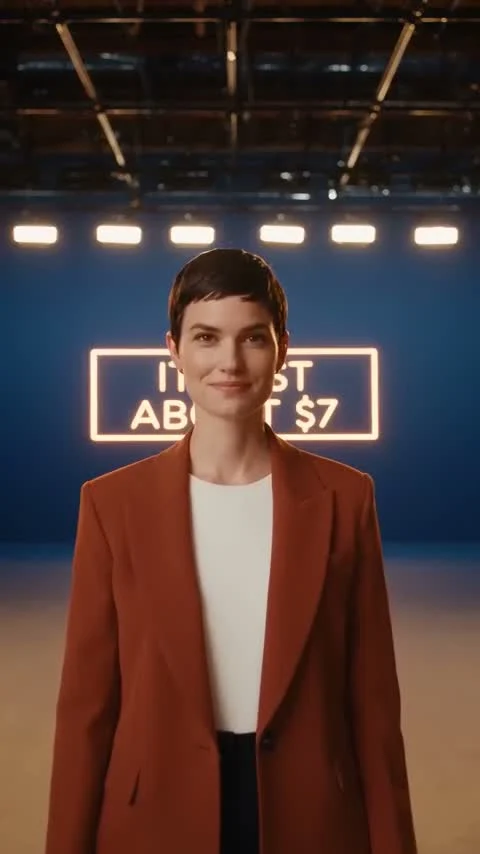
Both frames above come from one unbroken 30-second draft we generated at 480p using the timeline structure this page teaches: same performer in the first and last second, three scripted lines delivered on beat, and a neon sign the model lit on cue. The draft cost under a dollar to run before we committed anything to a full-resolution pass.
Ambience named by source beat ambience named by mood every time. "Room tone with distant traffic through a single open window" gave a consistent bed. "Atmospheric ambience" gave something different on every take.
On references, more assets stopped helping earlier than expected. A face image plus a voice clip plus a camera-motion clip, with each role stated explicitly, held identity well. Adding three more images of the same person in different lighting made the face less stable, not more, because nothing in the brief told the model which one was authoritative.
Should you believe the 4K claims?
No, not yet. A large share of the coverage published since July 31 describes Seedance 2.5 as a native 4K model. Following those claims back, the resolution figure does not appear in ByteDance's own launch material, which carries no resolution spec, no pricing, and no benchmark claim. The most likely explanation is that the 4K number is carried over from Seedance 2.0 keynote material and repeated downstream until it looked like consensus.
The practical answer is simpler. On Morphed, Seedance 2.5 renders at 480p or 720p. If you need a sharper deliverable, upscale the finished clip with a separate model rather than expecting more from this one. If you need higher resolution in a single pass, MiniMax H3 goes to 2K, and the H3 versus Veo 3 comparison covers where that sits against the rest of the field.
Developer API access is also still settling. The model shipped to ByteDance's consumer surfaces on launch day while direct API availability was described as coming soon, with wider developer access rolling out through early August. Any third-party page quoting a fixed API price or model ID for 2.5 is worth double-checking against the provider you actually intend to use.
A note on what these prompts deliberately avoid
Every example on this page uses an original subject. No real people, no franchises, no fictional characters, no brand names. That is a deliberate editorial choice, not an oversight. There are unresolved copyright questions around Seedance following studio cease-and-desist activity in early 2026 over franchise-character outputs, and prompt guides that hand you a ready-made way to generate protected characters are handing you a liability. Original subjects also happen to produce better commercial work, because the model spends its capacity on your scene instead of reconstructing someone else's.
You are responsible for what you upload as a reference and for the likenesses, voices, and music that end up in your outputs. A voice clip in @Audio1 and a face in @Image1 are exactly as sensitive as they sound.
When Seedance 2.5 is the wrong choice
Three situations where you should pick something else, stated plainly because most prompt guides will not.
You need output above 720p in one pass. Seedance 2.5 tops out at 720p on Morphed, and the 4K claims circulating for the upstream model are unverified. If sharpness is the deliverable, MiniMax H3 renders up to 2K and the prompt structure transfers with modest rewriting.
You are making short punchy clips. At 73 credits per second, a 5-second 720p hook costs 365 credits from a model built for 30-second continuous scenes with joint audio. That is paying for machinery you are not using. Seedance 2.0 covers short-form work at a lower rate, and the Seedance 2.0 versus Kling comparison covers the alternatives at that length. FLUX 3 Video is another option when you want sound on a shorter clip.
Your organization has open IP-risk sensitivities. If you work with licensed characters, talent likenesses, or client brands under strict usage terms, the unresolved situation around this model family is a reason to route that work elsewhere until it settles. Read the copyright background before putting a Seedance clip in a paid campaign for a client who will ask where it came from.
One more honest limitation: 30 seconds is a ceiling, not a suggestion. The extend-in-additional-rounds capability that exists upstream is not available here. If your concept needs 45 seconds, plan two separate takes and cut them in an editor rather than expecting the model to continue.
Where to start
Pick one 30-second brief, write it as three timed phases with the camera named in each, and render it at 480p for 1,020 credits before you spend 2,190 on the 720p version. That single habit will teach you more about this model than any prompt list, including this one. When you need the general-purpose categories, cinematic, product, UGC, vertical social, the Seedance 2.0 prompt library is the companion piece to this page and most of it applies unchanged.
Start a generation on Morphed with Seedance 2.5 text-to-video or reference-to-video.