

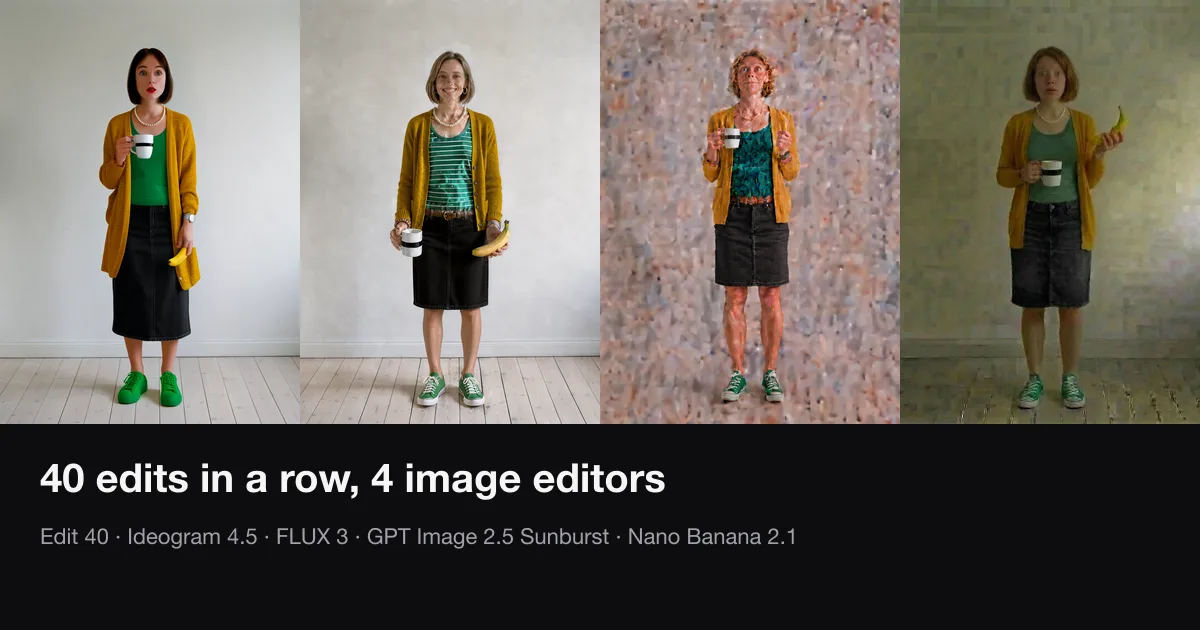
Ask an AI image editor to change one thing and keep everything else the same. Then do it again on the result. Then 38 more times. Some models leave the rest of the photo alone. Others repaint the whole frame on every edit, and the small changes add up.
We ran that test on four image editors on October 7, 2026: Ideogram 4.5 Edit, FLUX 3 Edit, GPT Image 2.5 Sunburst Edit and Nano Banana 2.1 Edit. Three photos, 40 chained edits each, 480 edits in total.
Short answer: Ideogram 4.5 and FLUX 3 kept the background. After 40 edits their background drift was 0.95 and 5.64 on a 0–255 scale, at or under the point where you can see it. GPT Image 2.5 Sunburst and Nano Banana 2.1 ended at 48.44 and 100.48. The plain wall behind the subject turned into a mosaic, and the change was visible by about edit 10.
The trade-off: Nano Banana 2.1 followed the instructions best. Ideogram 4.5 sometimes did nothing at all.
The results
Background drift after 40 chained edits. Lower is better. Under about 5 is invisible; about 10 is visible side by side.
| Model | Kitchen | Café | Still life | Mean |
|---|---|---|---|---|
| Ideogram 4.5 Edit | 0.00 | 2.86 | 0.00 | 0.95 |
| FLUX 3 Edit | 9.11 | 7.80 | 0.00 | 5.64 |
| GPT Image 2.5 Sunburst Edit | 41.98 | 58.36 | 44.99 | 48.44 |
| Nano Banana 2.1 Edit | 80.58 | 87.81 | 133.04 | 100.48 |
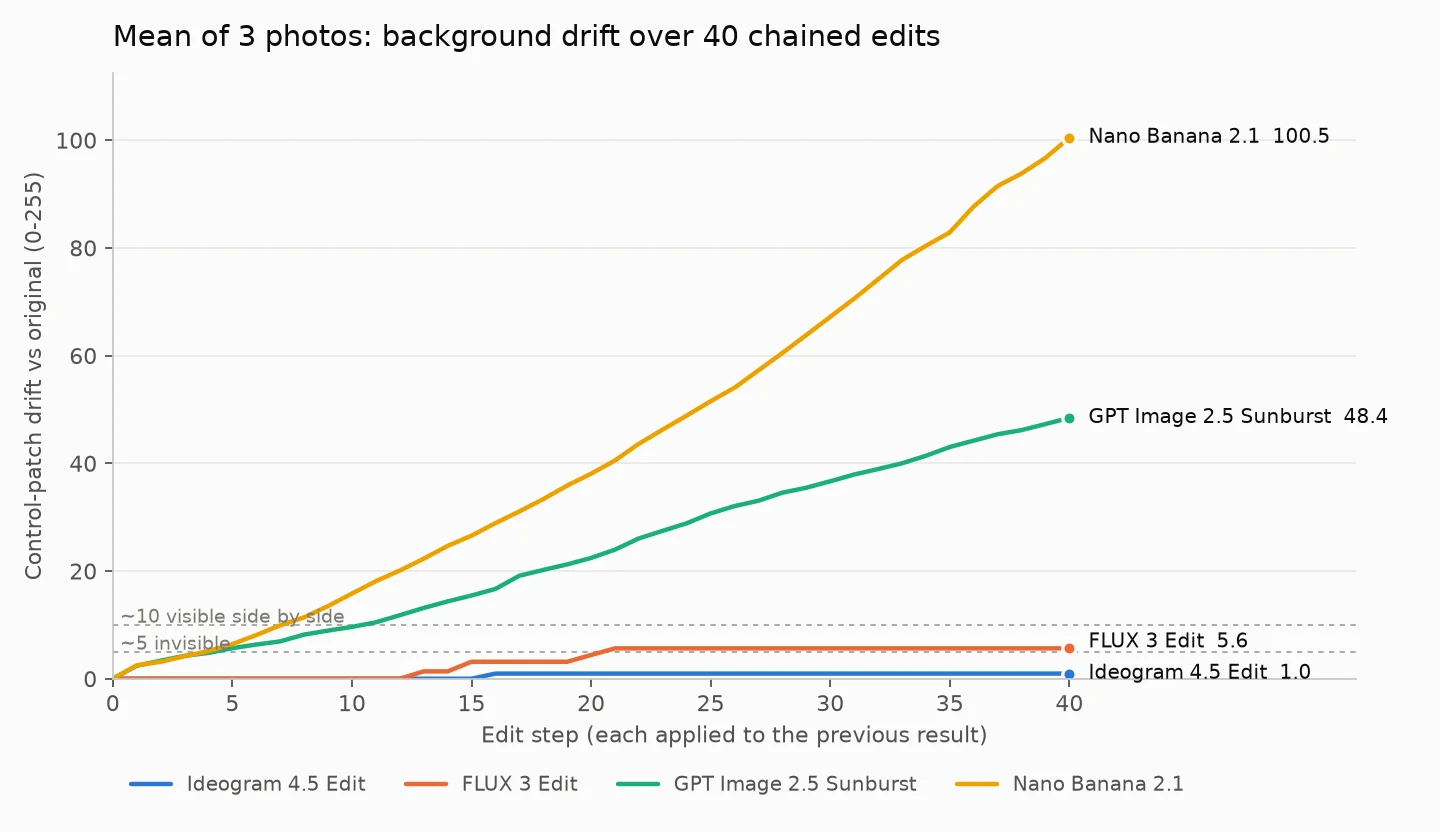
The two groups behave differently, not just by degree.
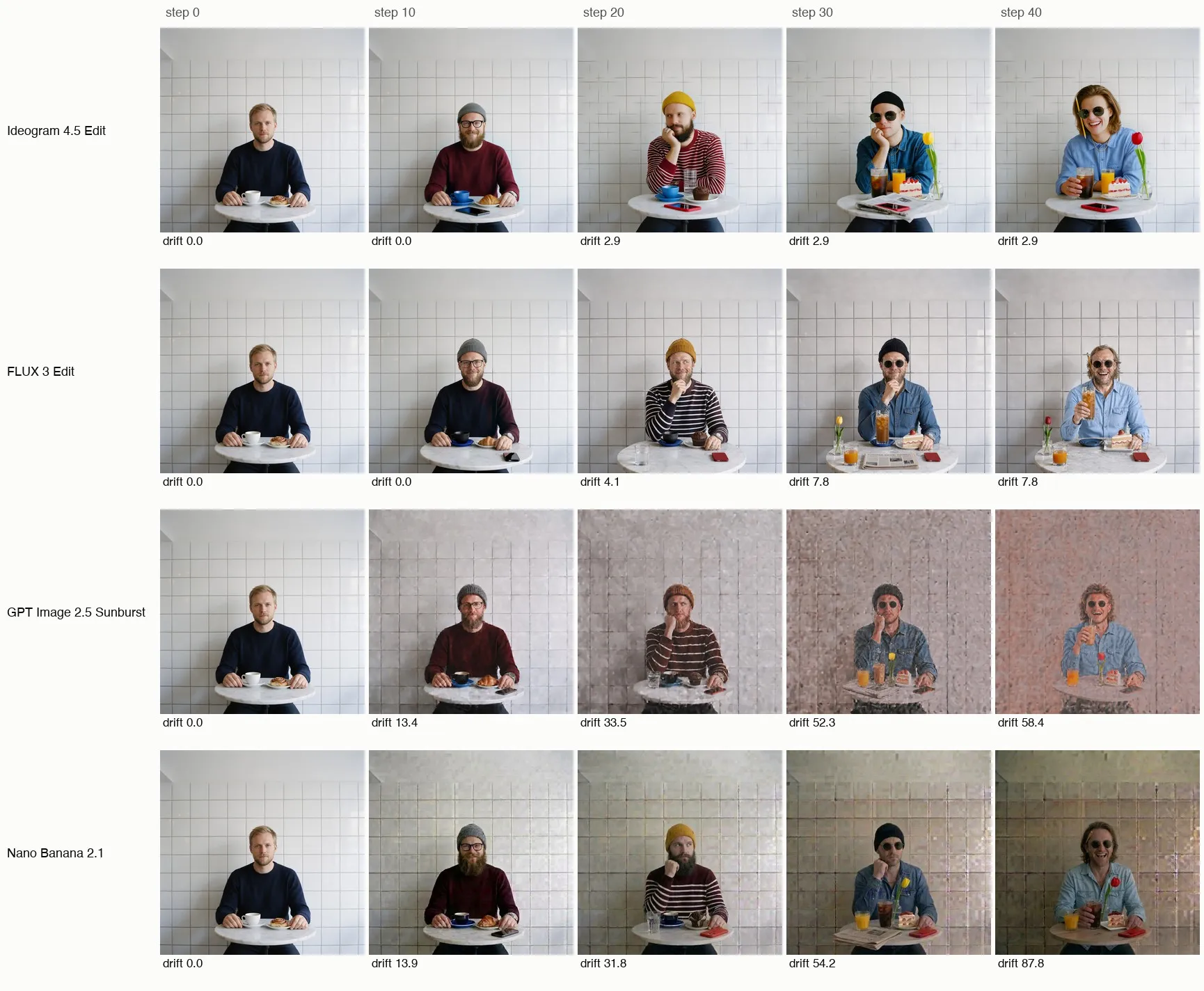
Ideogram 4.5 and FLUX 3 put the untouched pixels back. Their control areas scored exactly 0.0 for long stretches. Ideogram 4.5 stayed at 0.0 for all 40 edits on the kitchen and the still life. FLUX 3 stayed at 0.0 on the still life, and on the other two photos it moved in two jumps (edits 15 and 20 in the kitchen, 13 and 21 in the café) and then held flat.
GPT Image 2.5 Sunburst and Nano Banana 2.1 redraw the whole frame every time. Each edit adds a little noise and color shift to areas nobody asked to change. Averaged over the three photos, Nano Banana 2.1 crossed 10 at edit 8 and GPT Image 2.5 Sunburst at edit 11. By edit 40 the white kitchen wall was a pink or olive mosaic.
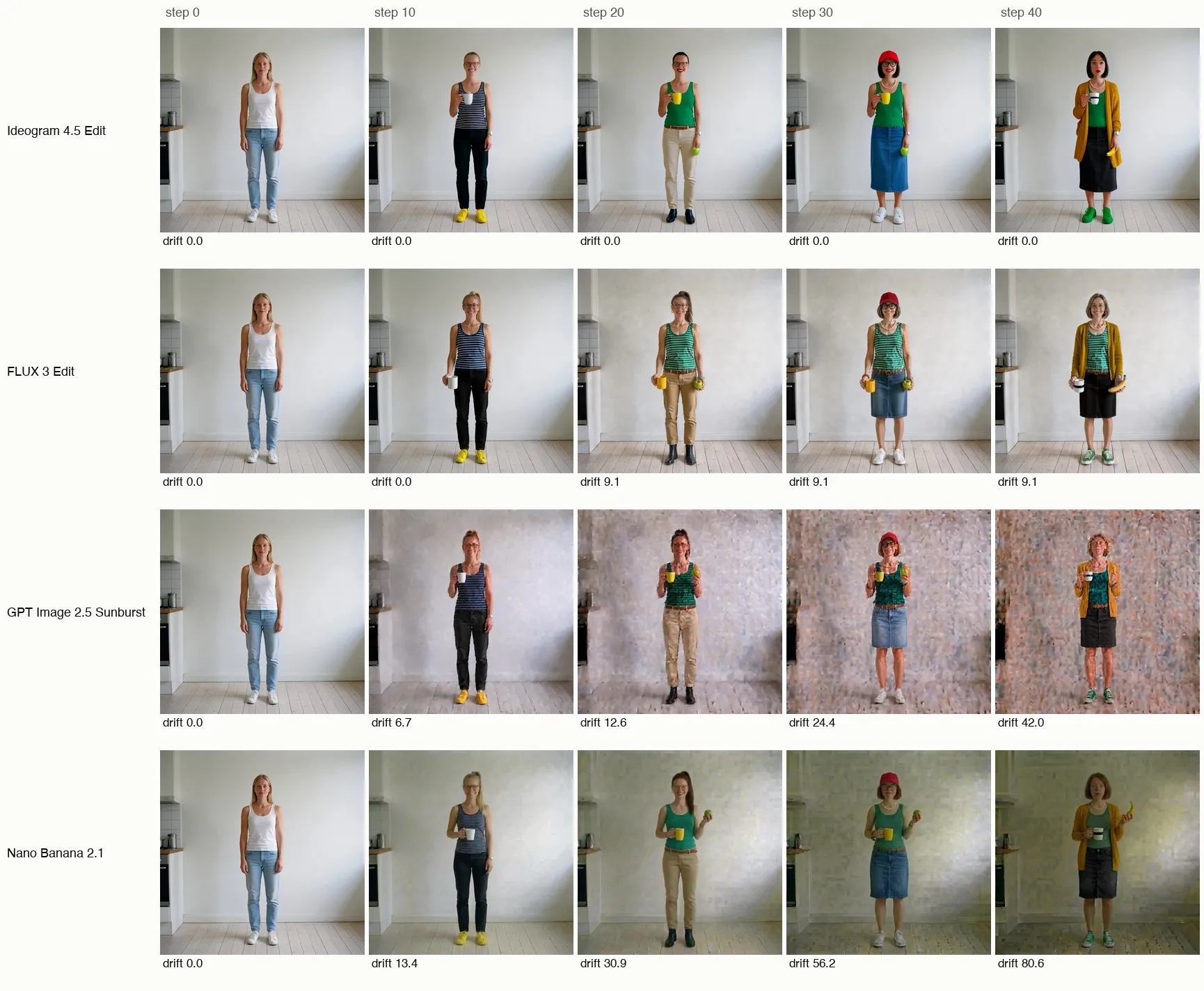
The hair color and the short bob in the kitchen chain are not drift. Edits 14 and 22 asked for them.
Where each model lost points
Drift is only half the job. We also checked every step by eye to see if the requested change actually happened.
- Nano Banana 2.1 followed instructions best. We found no clear misses in 120 edits. It is also the fastest, at a median of 12.6 seconds per edit.
- GPT Image 2.5 Sunburst missed about 3 to 4 edits. Median 17.2 seconds per edit.
- FLUX 3 missed or weakly applied about 5 to 7 edits. Closed eyes and a beard trim did not land, and the necklace never appeared. It was also the slowest at a median of 41 seconds, with 14 timeouts or 503 errors. All 14 succeeded on retry.
- Ideogram 4.5 sometimes did nothing. On several edits it returned a pixel-identical image: the necklace, earrings, freckles and nail polish. It turned "eyes closed" into a wink. Median 23.7 seconds per edit.
Ideogram 4.5's low café score also needs a caveat. It redrew the grout lines of the tiled wall, and the café man's face was replaced around edits 26 to 32. The café scored only 2.86 because a bright, plain wall shows little change in our measure even when its structure moves. Do not read Ideogram 4.5's numbers as a promise that faces stay the same.
Which editor should you use?
Many edits on the same scene: Ideogram 4.5 or FLUX 3. Product colorways, outfit swaps, prop changes, ad revisions. Anything where the background has to survive round after round. Check each step, because both will sometimes skip or soften an edit.
One edit where the instruction matters most: Nano Banana 2.1. It got the change right more often than any other model here. Use it for a single edit, not a 40-step chain.
GPT Image 2.5 Sunburst sits in between on instructions and drifts like Nano Banana 2.1, only more slowly.
On any model, branch instead of chaining. Make each edit from the original, or from a version you already approved, instead of from the latest result. A model that redraws the frame adds drift every round, so fewer rounds means less drift.
| Model | Morphed credits per edit (setting we tested) | Median seconds per edit |
|---|---|---|
| FLUX 3 Edit | 8 (1K) | 41 |
| Ideogram 4.5 Edit | 9 (Medium) | 23.7 |
| Nano Banana 2.1 Edit | 11.5 (1K) | 12.6 |
| GPT Image 2.5 Sunburst Edit | 12 (Medium) | 17.2 |
How we tested
This test copies the drift benchmark Stav Zilbershtein (@mightyking) posted on X. Credit for the method goes to him.
- Photos. Three generated photos: a woman in a kitchen, a man in a café and a milk-bottle still life. We made them with Seedream 5 Pro, a model outside the test, so no model edited its own image.
- Edits. 40 edits per photo, each asking for one change, followed by "Keep everything else in the image exactly the same." Each edit ran on the previous step's output. Each chain ran once.
- Control patches. Three background areas per photo that no edit touches, such as an empty stretch of wall.
- Alignment. We resized every output to the original size and aligned it to the original by the best whole-pixel shift within ±12 px, measured on the patches. Whole-image phase correlation found shifts that were not there, so we dropped it.
- Score. The mean absolute RGB difference between each step and the original image, over the patch pixels, on a 0–255 scale. Under about 5 is invisible; about 10 is visible side by side.
- Settings. The defaults Morphed runs: Ideogram 4.5 Edit at Medium with high edit precision, FLUX 3 Edit at 1K, GPT Image 2.5 Sunburst Edit at Medium (1024 × 1024), Nano Banana 2.1 Edit at 1K.
Read the 40 kitchen edits
Each edit ended with: "Keep everything else in the image exactly the same."

1. Make the tank top red
2. Make the jeans black
3. Make the sneakers bright yellow
4. Give her round tortoiseshell glasses
5. Put her hair up in a high ponytail
6. Make her smile with her teeth showing
7. Add a thin gold necklace
8. Make the tank top navy blue with thin white horizontal stripes
9. Add a silver wristwatch to her left wrist
10. Make her hold a white coffee mug in her right hand
11. Change the black jeans to khaki chinos
12. Add small gold hoop earrings
13. Change the sneakers to black leather ankle boots
14. Make her hair dark brown
15. Give her red lipstick
16. Make her hold a green apple in her left hand
17. Add a thin brown leather belt to her trousers
18. Make the tank top emerald green
19. Make the coffee mug yellow
20. Add a few freckles across her nose and cheeks
21. Roll the trouser legs up to just above the ankle
22. Cut her hair into a short chin-length bob
23. Change the gold necklace to a pearl necklace
24. Change the ankle boots to white canvas sneakers
25. Add a black baseball cap on her head
26. Make her eyes closed
27. Make the glasses black-framed
28. Add a beaded wooden bracelet to her right wrist
29. Change the trousers to a knee-length denim skirt
30. Make the baseball cap red
31. Add a light-grey cardigan worn open over the tank top
32. Replace the green apple in her hand with a banana
33. Give her pink nail polish
34. Make the cardigan mustard yellow
35. Make the sneakers green
36. Remove the glasses
37. Make her raise her eyebrows in surprise
38. Make the coffee mug white with a black stripe around it
39. Make the denim skirt black
40. Remove the baseball cap
This is three photos and one run per chain, not a statistical benchmark. A plain, bright wall also under-counts some changes, as the café result shows. For an earlier, shorter test with changed-pixel maps and text edits, read Ideogram 4.5 vs GPT Image 2.5, Nano Banana Pro and Seedream 5.
Try it on your own image
Open the AI image editor, upload a photo and pick the model for the job: Ideogram 4.5 or FLUX 3 for a chain of edits on one scene, Nano Banana 2.1 for a single edit that has to land. Ask for one change per prompt, and go back to your original when the result starts to drift.