

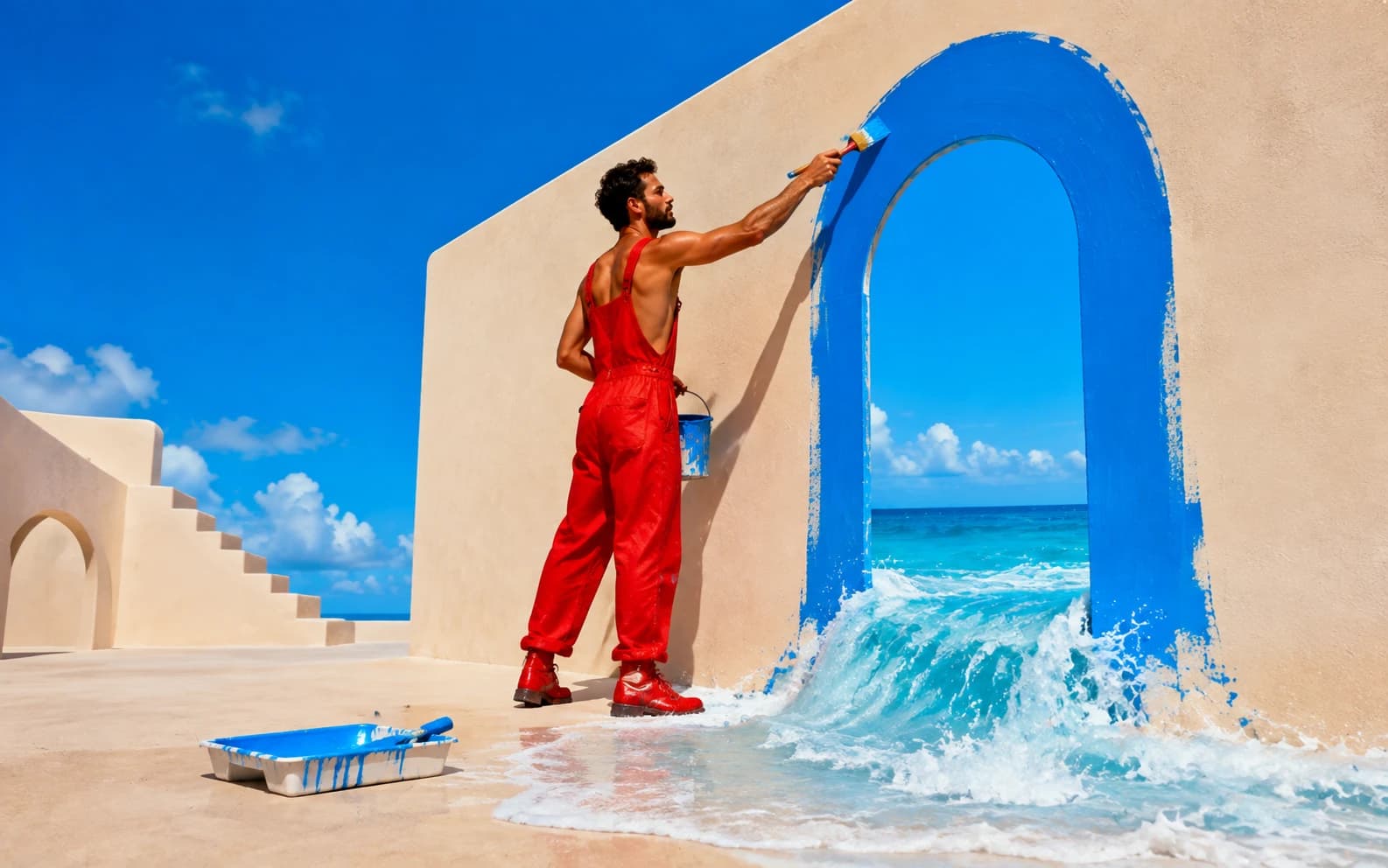
GPT Image 2 (launched April 21, 2026 by OpenAI) renders accurate text, labels, UI screens, and multilingual typography inside images. Available on Morphed at 2 credits (low), 12 credits (medium), or 40 credits (high). Best prompt structure: artifact, exact text in quotes, layout, visual system, details, constraints.
GPT Image 2 changes what is worth prompting for. Older image models were strongest when you avoided text, dense layouts, small labels, UI screens, and complex posters. GPT Image 2 is built for exactly those jobs.
The practical shift is simple: stop writing image prompts like moodboards. Write them like creative briefs. This guide gives you 25+ copy-paste prompts, the six-part structure that makes them work, a cost breakdown across quality tiers, and edit templates you can scope cleanly. Run any of these on GPT Image 2 on Morphed.
For the newer models, see our GPT Image 2.5 ad workflow and 48-image comparison of Flare, Sunburst, and other models.
Key Takeaways
- GPT Image 2 is strongest for text-heavy images: product labels, posters, UI mockups, infographics, multilingual signs, and photoreal campaign visuals.
- Put exact text in quotes, specify placement, hierarchy, font style, and list constraints explicitly (no extra words, no duplicate text, no watermark).
- Quality tiers on Morphed: low (2 credits) for drafts, medium (12 credits) for standard work, high (40 credits) for text-heavy final assets and photoreal campaigns.
- The edit endpoint accepts up to 16 reference images per request. Label each input by role.
- Proofread every final image before it ships to ads, packaging, or client work. Text accuracy is dramatically improved but not perfect.
GPT Image 2 at a Glance: Specs, Tiers, and Inputs
Before the prompt patterns, the hard specs. These determine cost per asset, output size, and whether your workflow needs the edit endpoint or a fresh generate call.
| Parameter | Value |
|---|---|
| Launch date | April 21, 2026 (OpenAI) |
| Endpoint types | Generate (gpt-image-2), Edit (gpt-image-2/edit) |
| Quality tiers | Low / Medium / High |
| Credit cost on Morphed | 2 / 12 / 40 credits per image |
| Aspect ratios | 1:1, 4:3, 3:4, 16:9, 9:16 |
| Edit input limit | Up to 16 reference images per request |
| Output formats | PNG, WebP (supports background: "transparent"), JPEG |
| Strongest at | Text inside images, UI mockups, packaging, infographics, multilingual type |
| Weakest at | Fast batch ideation (use Z-Image Turbo or Flux Dev instead) |
Read the full GPT Image 2 model page on Morphed for live pricing and the API reference.
What Makes GPT Image 2 Different?
OpenAI introduced ChatGPT Images 2.0 on April 21, 2026, and its launch examples focus heavily on posters, multilingual typography, handwritten notes, comics, product-style layouts, and realistic image styles. fal's GPT Image 2 page describes the model as quality-first, with strong photorealism, text rendering, and product photography support.
That means the best GPT Image 2 prompts are not just "beautiful cinematic image" prompts. They are prompts for finished artifacts:
| Use Case | Why GPT Image 2 Is Useful | Prompt Detail To Add |
|---|---|---|
| Product packaging | Better label and small text rendering | Brand name, label copy, material, lighting |
| Social ads | Cleaner typography and CTA layouts | Headline, subheadline, button copy, format |
| Infographics | Handles visual hierarchy and labels | Sections, charts, icons, source footer |
| UI mockups | Can render realistic app screens | Screen type, data, nav, rows, buttons |
| Comics | Better panel logic and readable bubbles | Panel count, character lock, dialogue |
| Photoreal campaigns | Stronger material, light, and scene realism | Lens feel, lighting, surface detail |
The Best GPT Image 2 Prompt Structure
Use this structure when the output needs to look like a real deliverable:
Artifact:
[poster / product photo / UI screenshot / infographic / comic / ad / packaging]

Exact text:
[write every headline, label, button, or caption in quotes]

Layout:
[where each major element appears]

Visual system:
[photography style, typography, color palette, material, lighting]

Important details:
[objects, charts, labels, props, physical realism]

Constraints:
[no extra words, no duplicate text, no watermark, no logo drift, preserve layout]
The important part is not the formatting itself. The important part is that the model knows what kind of finished image it is making.
Text Prompt Rules That Actually Help
GPT Image 2 can handle text better, but it still benefits from typographic instructions.
| Weak Prompt | Better GPT Image 2 Prompt |
|---|---|
| "Make a cool poster for a music festival" | "Create a vertical concert poster. Exact headline: "NEON NIGHTS MUSIC FESTIVAL 2026". Put the date and venue below the title. Use 12 lineup names in descending type size." |
| "Product photo of a coffee bottle" | "Photorealistic product photo of a glass cold-brew bottle. Label reads exactly: "MIDNIGHT BREW" and "Slow-Steeped for 18 Hours". Show condensation and dark marble surface." |
| "Modern app dashboard" | "Pixel-perfect mobile fintech dashboard showing balance "$12,847.32", a "Send Money" button, transactions list, and bottom nav with Home, Cards, Pay, Profile." |
Use these rules:
- Put literal text in quotes.
- Say "Exact text" when spelling matters.
- Specify where text appears: top center, left column, label front, footer, CTA button.
- Specify typography: bold sans serif, hand-lettered chalk, serif book-cover title, tiny condensed credits.
- Add "no extra words" and "no duplicate text" for posters, packaging, and UI.
- Proofread the output before publishing.
Quality Settings: Low vs Medium vs High (With Cost Math)
Use quality as a product decision, not a random setting. The gap between tiers is large: high quality costs 20x more credits than low on Morphed (40 vs 2). That is the right trade when a bad label kills the asset. It is the wrong trade when you are still exploring.
| Quality | Credits on Morphed | Best For | Avoid For |
|---|---|---|---|
| Low | 2 | Fast drafts, rough concepts, thumbnails, early layout tests, variations | Dense text, product labels, final ads |
| Medium | 12 | Default creative work, social images, normal product shots, blog visuals | High-stakes packaging or tiny legal copy |
| High | 40 | Product labels, UI screens, posters, infographics, photoreal campaign images, hero banners | Cheap brainstorming where speed matters more |
Break-even: when does "high" pay for itself?
If the final image must be reshot because text drifted or a label is wrong, the retry cost is the generation itself plus review time. At Morphed credit rates:
- Exploration phase (20 variations): 20 x 2 credits = 40 credits on low. The cost of a single high-quality render.
- Finalization (1 hero asset): 1 x 40 credits on high is cheaper than 4 x 12 credits on medium with a 1-in-4 retry rate. Skip the middle tier once the prompt is locked.
- Batch social (10 feed posts): 10 x 12 credits = 120 credits on medium beats 10 x 40 on high unless the captions are brand-critical.
Rule: use low for breadth, medium for throughput, high only when the text or label must be correct the first time.
If the image contains many words, small labels, or important brand text, use high quality. Everything else runs fine on medium.
GPT Image 2 Prompts for Product and Packaging
Product prompts should read like a shot list from a brand studio. Include label text, material, lighting, surface, and what should not drift.
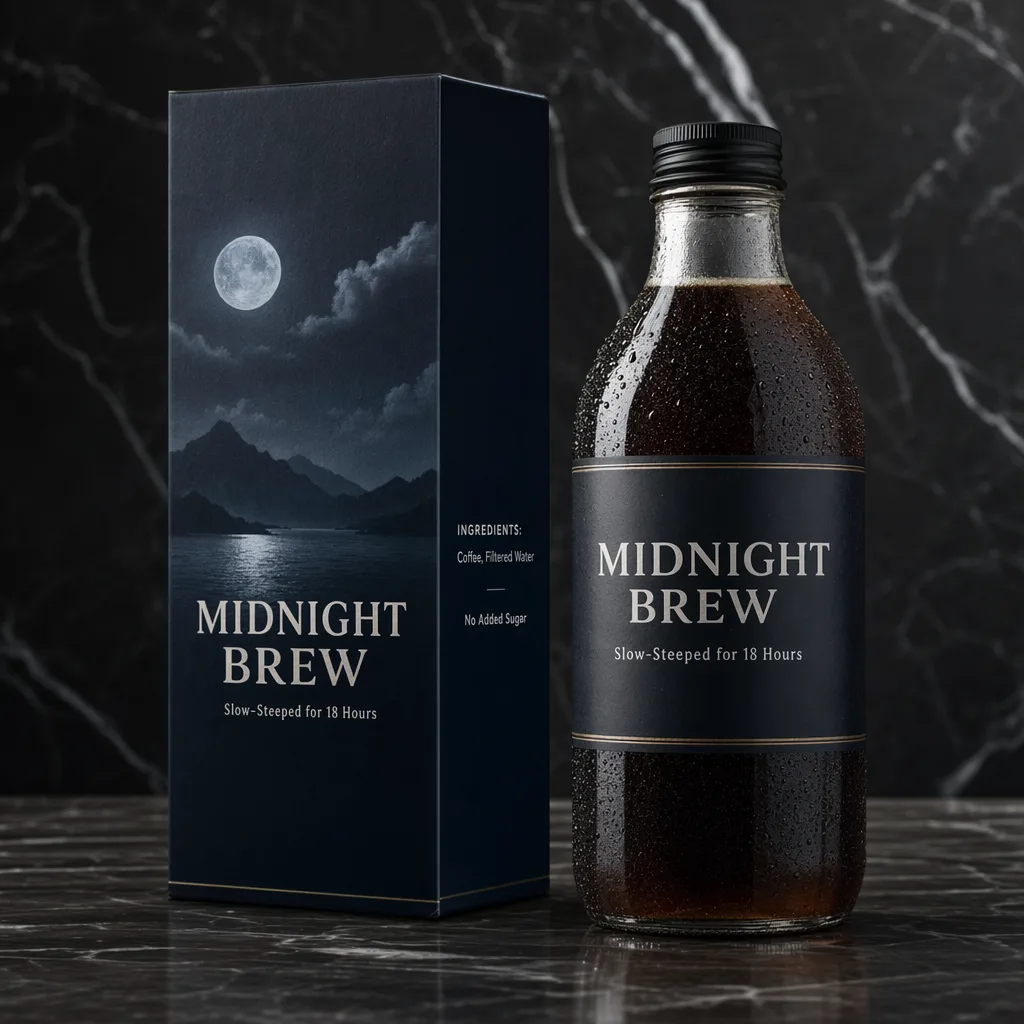
Artifact:
Premium product photo for a cold-brew coffee brand.

Exact text:
The bottle label reads "MIDNIGHT BREW".
The tagline reads "Slow-Steeped for 18 Hours".
The side panel includes "Coffee, Filtered Water" and "No Added Sugar".

Layout:
Glass bottle on the right, carton on the left, both sitting on dark marble.

Visual system:
Dark luxury packaging, soft directional studio lighting, condensation droplets on glass, crisp label typography.

Constraints:
No extra brand names, no misspelled label text, no watermark.
Photorealistic flat-lay of three skincare tubes for a fictional brand called "AURA". Each tube has the same pale pink and gold packaging system. Tube 1 text: "Hydrating Daily Moisturizer". Tube 2 uses Korean label text. Tube 3 uses Arabic label text. All labels are clean, centered, and legible. White marble surface, soft even lighting, no extra products, no watermark.
Clinical product photo of a fictional prescription medicine box named "SOMNIVEX 10mg". Front panel reads "30 Extended-Release Tablets" and "Rx Only". Side panel includes "Active Ingredient: Zolpirene Tartrate 10mg", a barcode, lot number, and expiry date. Pharma-grade white background, sharp print, realistic cardboard texture. No real company logos, no watermark.
GPT Image 2 Prompts for Ads and Social Creative
Ad prompts work best when you include the exact format and hierarchy.
Create a 9:16 Instagram story ad for a fitness app called "PULSEFIT".

Exact text:
Headline: "Your First 7 Days Free"
Subheading: "Track. Train. Transform."
CTA button: "Download Now"

Layout:
Headline in the top third, runner silhouette in the center, glowing green CTA button near the bottom.

Visual system:
Dark gradient background, crisp white type, electric green accent, modern app-launch style.

Constraints:
No extra words, no duplicate CTA, no watermark.
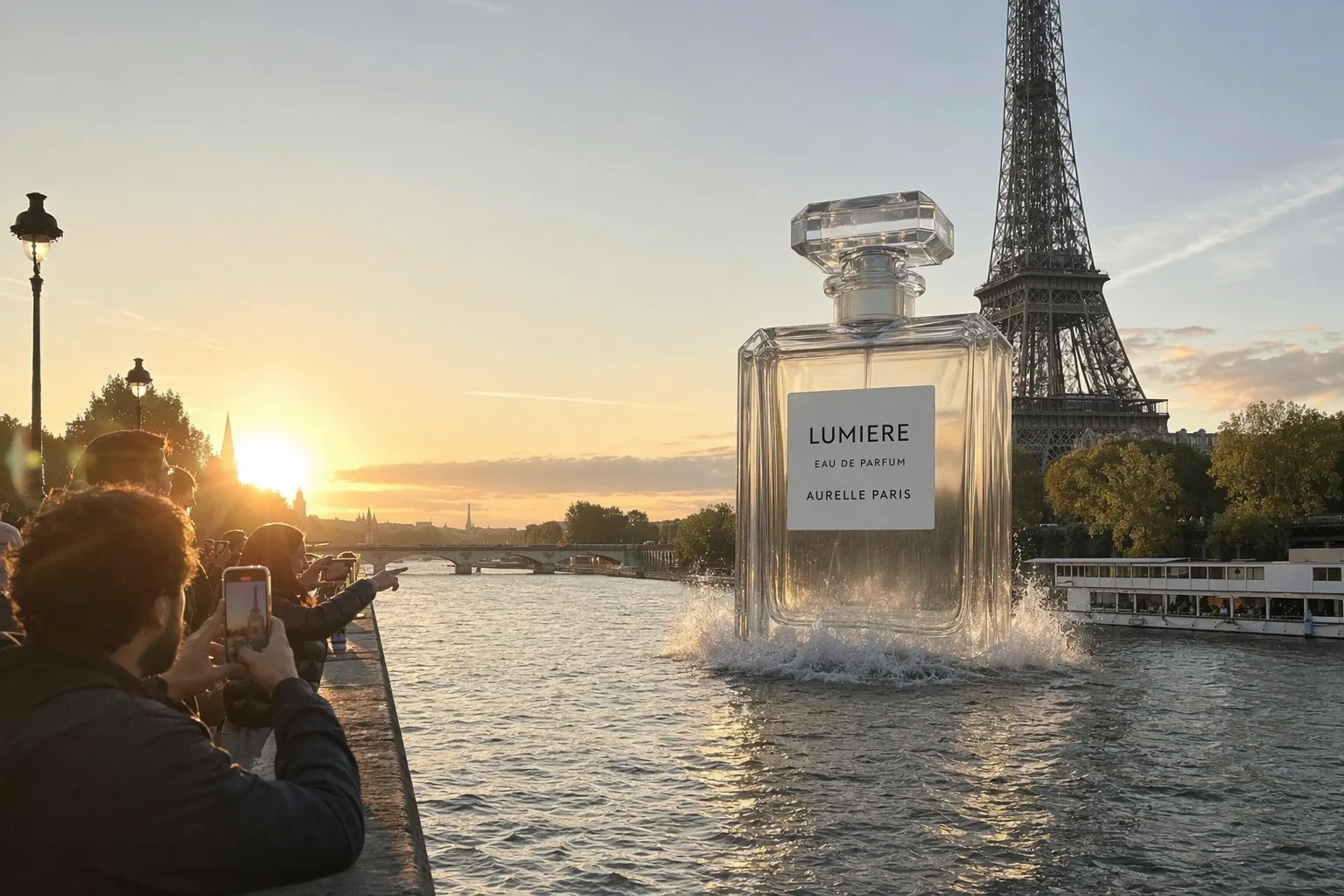
Photorealistic fake-out-of-home perfume campaign photographed like a passerby phone photo at golden hour. A giant crystal perfume bottle rises from the Seine near the Eiffel Tower. Label reads "LUMIERE", "Eau de Parfum", and "AURELLE PARIS". Tourists point and take photos from the bridge. Natural lens flare, believable city scale, water splashes around the bottle, no extra logos.
Vertical movie poster for a sci-fi thriller titled "MERIDIAN". A lone astronaut stands at the edge of a crater on an alien planet, visor reflecting a dying star. Title "MERIDIAN" in wide metallic chrome lettering at the bottom. Tagline: "The last signal was not a warning." Tiny condensed credits block below, teal and burnt orange grade, dramatic volumetric light, no extra title variations.
GPT Image 2 Prompts for UI Screens and Dashboards
UI prompts need product language, real numbers, and screen structure. Do not just say "modern dashboard".
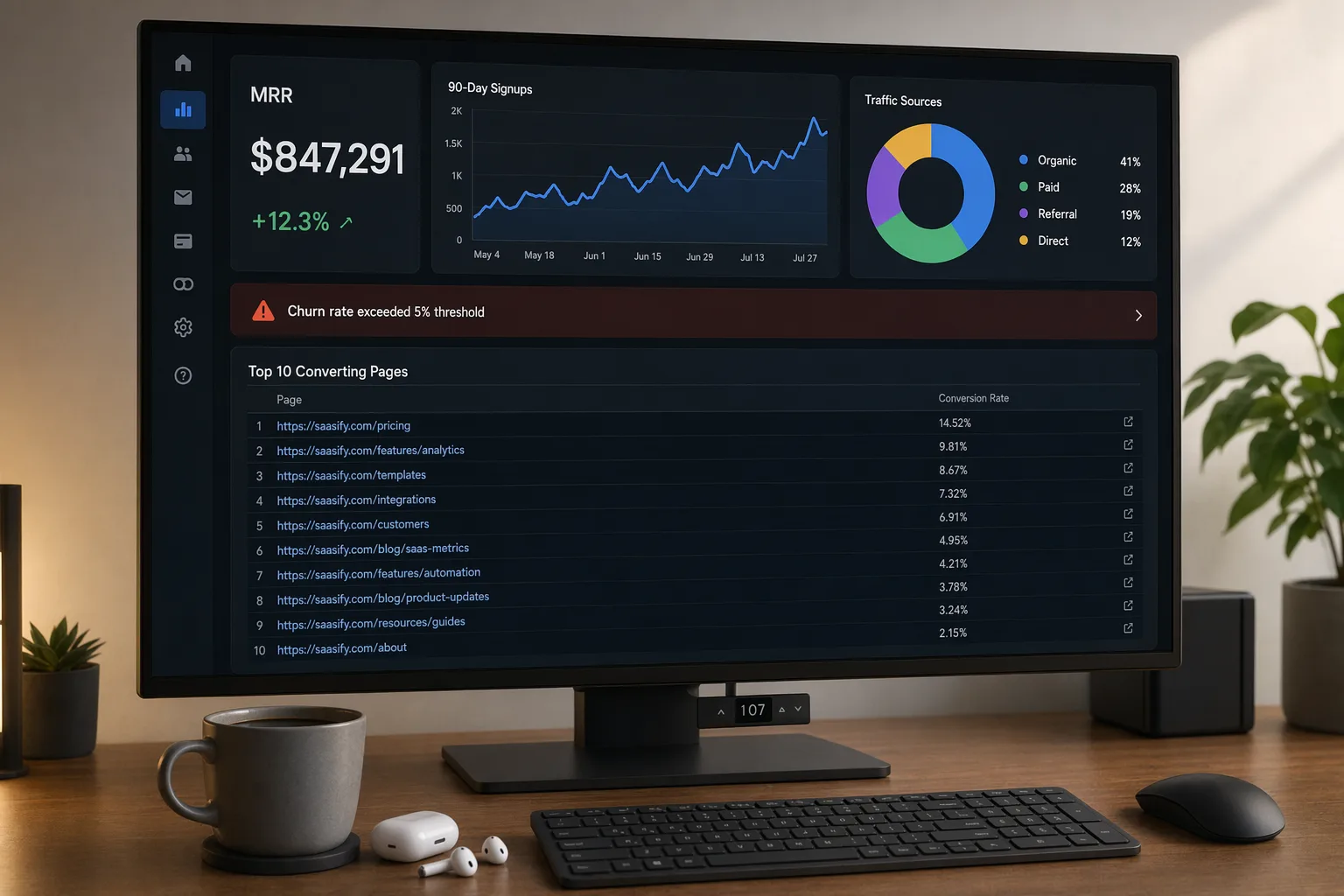
Photorealistic shot of a 27-inch monitor on a standing desk showing a dark-mode SaaS analytics dashboard.

Exact text and data:
"MRR $847,291"
"+12.3%"
"Traffic Sources"
"Organic 41%"
"Paid 28%"
"Referral 19%"
"Direct 12%"
"Churn rate exceeded 5% threshold"

Layout:
Left sidebar, KPI cards across the top, 90-day signups line chart, traffic donut chart, and a table titled "Top 10 Converting Pages".

Visual system:
Dark mode UI, blue and green chart accents, realistic office desk, coffee mug and earbuds near the keyboard.

Constraints:
No gibberish UI text, no duplicated widgets, no watermark.
A pixel-perfect mobile fintech dashboard screenshot in light mode. Top card shows balance "$12,847.32". Primary button reads "Send Money". Recent transactions list includes "Coffee House - $5.80", "Metro Pass - $38.00", "Salary Deposit +$3,200.00". Bottom navigation labels: Home, Cards, Pay, Profile. iOS-style design, clean spacing, realistic app icons, no extra tabs.
GPT Image 2 Prompts for Infographics, Posters, and Dense Typography
This is where GPT Image 2 is most different from older image models. Give it hierarchy, sections, labels, and constraints.
Create a clean modern infographic poster titled "The Science of Sleep".

Content:
Five labeled sections: Light Sleep, Deep Sleep, REM Sleep, Circadian Rhythm, Recovery.
Include a circular chart showing average time per stage.
Add small icons for each phase.
Footer text: "Sources: Sleep Foundation, NIH".

Visual system:
Navy blue, soft lavender, and white. Magazine-quality editorial layout, clear spacing, readable labels.

Constraints:
No extra sections, no misspelled title, no watermark.
Concert poster for "NEON NIGHTS MUSIC FESTIVAL 2026". Include 12 fictional band names in descending type size. Venue: "Riverside Amphitheatre, Austin TX". Date: "August 15-17, 2026". Ticket line: "Tickets from $89 at neonnights.com". Retro synthwave palette, pink and cyan on black, dense but readable typography, no duplicate dates.
Professional comparison chart titled "Free vs Pro Plan" for a SaaS product called "TaskFlow". Two columns, eight feature rows, checkmarks and X marks, pricing at the bottom: "Free: $0/mo" and "Pro: $19/mo". Blue CTA banner reads "Upgrade to Pro Today". Clean corporate layout, readable small text, no extra pricing tiers.
GPT Image 2 Prompts for Comics and Storyboards
For comics, define the character first, then each panel. Keep dialogue short.
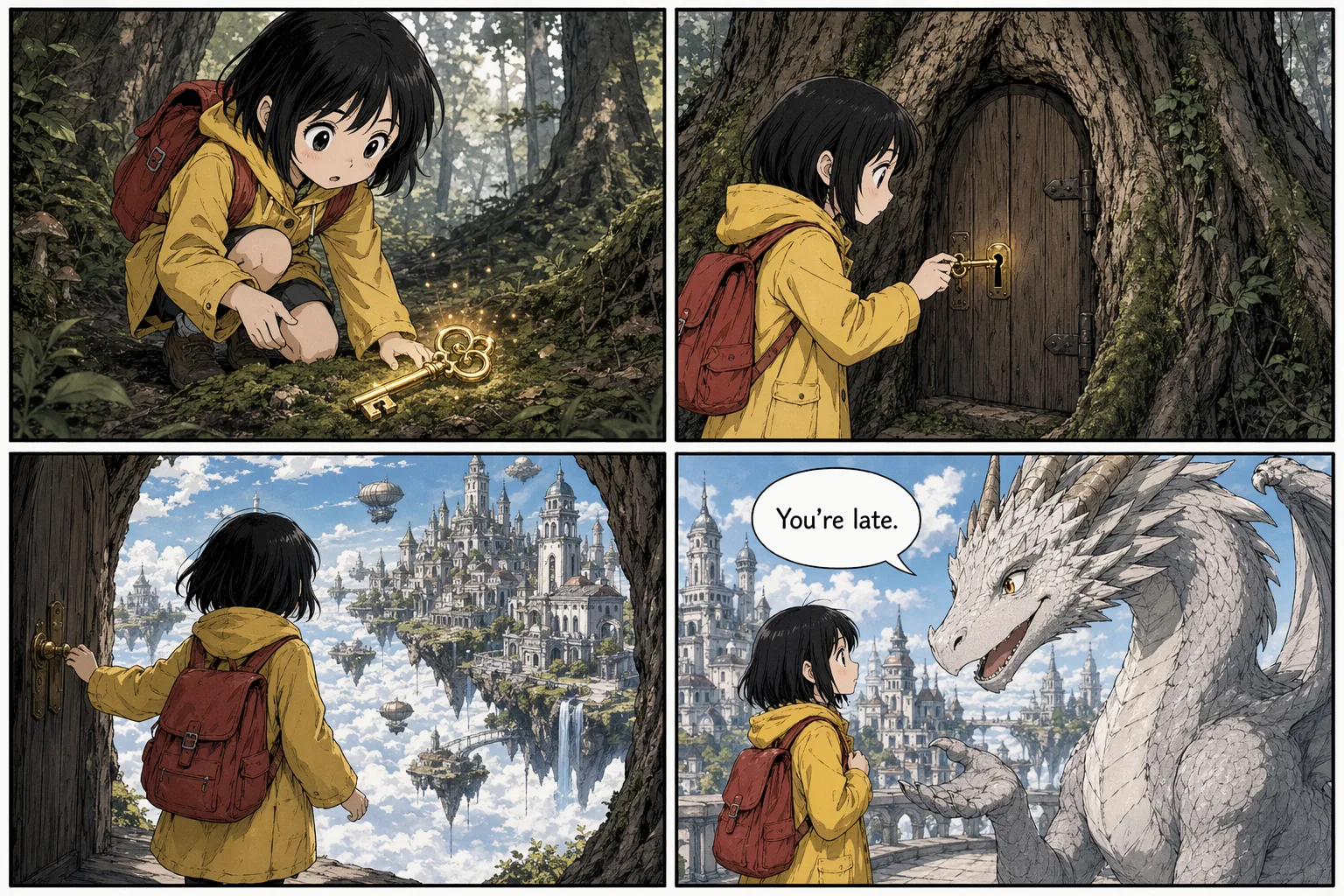
Create a single-page 4-panel manga comic strip.

Character:
A young girl with short black hair, yellow raincoat, and red backpack. Keep her design consistent across all panels.

Panel 1:
She finds a glowing brass key on a mossy forest floor.

Panel 2:
She unlocks a small door hidden in a giant oak tree.

Panel 3:
She steps into a floating city above the clouds.

Panel 4:
A friendly dragon greets her. Speech bubble reads exactly: "You're late."

Style:
Clean Japanese manga ink style, readable panel borders, cinematic backgrounds.

Constraints:
No extra speech bubbles, no extra text, no watermark.
Create a 4-panel indie comic page in a 2x2 grid. Character A is a woman with short curly hair and a denim jacket. Character B is a man in a beige hoodie. Keep both characters consistent. Setting: quiet cafe at dusk. Panel 1: both sit with coffee. A says "We always wait." Panel 2: close-up on B. B says "Then start small." Panel 3: A smiles. A says "Five minutes?" Panel 4: both laugh. B says "Right now." Soft colors, readable lettering, no extra dialogue.
GPT Image 2 Prompts for Photoreal and Cinematic Images
Photoreal prompts need ordinary physical detail. Vague cinematic words are weaker than camera, light, material, and imperfection.
Photorealistic vintage Kodachrome photograph from 1986. A family of four poses in front of a wood-paneled station wagon in a suburban driveway. Dad wears aviator sunglasses and a mustard polo. Mom wears high-waisted jeans. Two kids hold popsicles. A bumper sticker reads "I LOVE LAKE TAHOE". Warm afternoon light, slightly oversaturated Kodachrome colors, orange date stamp reading "AUG 86".
Photorealistic editorial documentary photo of an elderly fisherman mending a turquoise net on a weathered wooden boat in a Southeast Asian harbor. Boat name "SARI LAUT" painted in chipped white letters. Deep wrinkles, faded red headwrap, calloused hands mid-stitch, colorful longtail boats behind him, hazy mountains, golden hour sidelight, 85mm lens feel, Kodak Portra 400 color.
Photorealistic candid paparazzi-style night photo outside a restaurant. A fictional celebrity couple exits through a glass door. Window lettering reads "RISTORANTE CAVALLI - DAL 1978". Harsh direct flash, long telephoto compression, slightly blown highlights, motion blur on a bodyguard hand entering frame, gritty tabloid energy, no real celebrity likenesses.
GPT Image 2 Edit Prompt Template
For image editing, do not write a normal generation prompt. Write a scoped edit.
Change:
Replace the background with a warm studio backdrop.

Preserve:
Keep the subject's face, pose, hair, hands, clothing, lighting direction, shadows, and camera framing exactly the same.

Physical realism:
Match the new background to the original lens, perspective, and contact shadows.

Constraints:
Do not change the identity. Do not redesign the outfit. No watermark.
For multi-image edits, label every input:
Image 1: base portrait to preserve.
Image 2: jacket reference.
Image 3: boots reference.

Instruction:
Dress the person from Image 1 using the jacket from Image 2 and boots from Image 3.

Preserve:
Face, skin tone, body shape, pose, hands, hair, background, lighting, and camera angle.

Constraints:
Replace only the clothing. No extra accessories, no text, no logos.
What We Tested: 30 Prompts Across 6 Artifact Types
To find which parts of a GPT Image 2 prompt carry the most weight, we ran 30 prompts on Morphed across six artifact categories (packaging, ads, UI, infographics, comics, photoreal). Each prompt was generated twice: once as a loose moodboard-style request, once as a structured six-part brief with exact text in quotes. Results below describe the pattern we observed, not a formal benchmark.
| Prompt Type | Moodboard Style | Six-Part Brief | Biggest Delta |
|---|---|---|---|
| Product packaging | Label legible in ~1 of 3 renders | Label legible on first try in most cases | Typography fidelity |
| Social ad creative | CTA text often paraphrased | CTA rendered verbatim when quoted | Exact-match text |
| UI dashboard | Realistic-looking but fake data labels | Numbers and row labels correct when listed | Data accuracy |
| Infographic poster | Sections drifted or merged | Section count and labels respected | Layout control |
| 4-panel comic | Character appearance shifted across panels | Anchor description held consistent | Character lock |
| Photoreal hero | Generic "cinematic" look | Specific lens, lighting, imperfections landed | Physical realism |
The pattern: moodboard prompts produce usable images, but require more retries to land the copy correctly. Structured briefs with quoted text cut text drift sharply on the first attempt. On high-stakes assets (packaging, UI, ads) that single-retry savings often justifies the high-quality tier over the medium tier.
Methodology note: all tests used medium quality, 1:1 aspect ratio, single generation per prompt on the fal.ai endpoint via Morphed. Tests ran April 22, 2026. This is an observational comparison, not a statistically controlled study.
When GPT Image 2 Is the Wrong Choice
GPT Image 2 is not the right tool for every job. Skip it when:
- You need 50+ cheap variations for a moodboard. Use Z-Image Turbo or Flux Dev at 1-3 credits per image. GPT Image 2's low tier still costs 2 credits and runs slower than speed-optimized models.
- You need aggressive stylized illustration. GPT Image 2 defaults toward realism. For anime, chibi, chunky pixel art, or heavy painterly illustration, Nano Banana Pro and dedicated illustration models often look cleaner.
- You need the same character across 20+ frames. GPT Image 2 holds character identity across a few panels when you anchor the description, but a purpose-built character-consistency model is stronger for long sequences.
- You need sub-second generation for a live product experience. GPT Image 2 is quality-first. For real-time UX, use a faster model.
- You need fully local or on-prem inference. GPT Image 2 is API-only via OpenAI and fal partners.
- Your use case can be solved by a template. If the output is always the same layout with swapped fields (e.g., certificate generator), a HTML-to-image pipeline is cheaper and more reliable than any image model.
If you are doing anything on this list, you are paying a premium for capabilities you will not use. Pick a different model on Morphed and save the credits.
Common GPT Image 2 Prompt Mistakes
Asking for text without treating it as typography
"Add text" is weaker than exact copy, placement, font style, and hierarchy.
Overloading one image with too many jobs
A product shot, infographic, UI dashboard, and comic panel in one prompt will usually become cluttered. Pick one artifact type.
Using vague praise instead of visual facts
"Premium, stunning, viral, beautiful" does not tell the model what to render. "Brushed aluminum, softbox reflection, left-aligned serif headline" does.
Forgetting constraints
If you do not want extra words, duplicate labels, extra products, or watermark-like marks, say so.
Skipping final proofread
GPT Image 2 is much better with text, but production images still need human review. Check spelling, numbers, brand names, and any small print before publishing.
GPT Image 2 Prompting FAQ
How is GPT Image 2 different from Nano Banana 2 or Flux 2?
GPT Image 2 is the strongest widely available model for text inside images as of April 2026. Nano Banana 2 is stronger for character consistency across sequences and tends to feel more natural in portrait work. Flux 2 matches photorealism but handles dense typography less reliably. Pick GPT Image 2 when the asset has readable copy; pick an alternative for heavy stylized or sequence work.
Why is my GPT Image 2 text still coming out wrong?
Three usual causes: the exact text is not in quotes, the prompt lists multiple competing text strings without placement cues, or the image is on the low quality tier. Move literal copy into quotes, specify where each string appears (headline top center, label front, CTA bottom right), and upgrade to high quality for any asset where legibility matters.
Can GPT Image 2 render non-Latin scripts?
Yes. Korean, Japanese, Chinese, Arabic, Hebrew, Cyrillic, and Devanagari scripts work in practice. Write the exact characters (not a transliteration), state which language each label uses, and put each string in quotes. Native speakers should proofread before publishing, same as with English.
What is the token or character limit for a GPT Image 2 prompt?
The prompt is passed as a text string to the model and there is no hard public character limit documented by OpenAI, but longer prompts reliably perform worse past roughly a dense paragraph. Split very long briefs into layered prompts or use the edit endpoint to iterate.
Is GPT Image 2 available outside ChatGPT?
Yes. GPT Image 2 is available through the OpenAI API and via partner platforms including fal.ai. On Morphed you can generate and edit with GPT Image 2 alongside other image models in one workspace, with transparent credit pricing per quality tier.
Does GPT Image 2 support transparent PNGs?
Yes. Set the output format to PNG or WebP and pass background: "transparent" on the generation call. JPEG output falls back to opaque.
Final Rule
The best GPT Image 2 prompts are not longer. They are more explicit.
Write the artifact, exact text, layout, visual system, important details, and constraints. That turns the model from a random image generator into a useful production tool.
Try these prompts on GPT Image 2 on Morphed. Start on the low tier while you iterate on the brief, then switch to high once the layout and copy are locked. On Morphed, you can run GPT Image 2 alongside Nano Banana 2, Flux 2, and other models in one workspace and pick the right tool per shot.
Related Guides
- Nano Banana 2 Prompts Guide
- Nano Banana Prompts for Product Photography
- Nano Banana Prompts for Posters
- Nano Banana Prompts for Editing Images
- Seedance 2.0 Prompt Guide
- Best AI Image Generators